

How does a browser know where a website lives?
The answer is DNS. Here's how it works, one record at a time

You type google.com, press Enter, and a moment later the page appears on your screen. But your browser has no idea where that website lives. So how does it find the right computer out of billions?
I'm learning full-stack development, and I recently started learning DNS. In this post, I'll share what I learned about DNS and its records (NS, A, AAAA, CNAME, MX, and TXT). I'll use simple language and real-life examples, so if you're a beginner, this is for you.
What is DNS?
Without DNS, you would have to type a number like 142.250.195.46 in your browser instead of a name. This number is called an IP address, and computers use it as a unique identity to communicate with each other. But people can't remember these numbers. Imagine memorizing a different number for every website you visit.
Now think about calling your best friend. You don't type "their number", you just search "their name" in your phonebook and call. DNS works the same way: it is the phonebook of the internet. You type the name, and DNS finds the number for you.

You type
google.comand press Enter. Your browser asks DNS where this website lives.DNS converts the domain name into an IP address and gives it back to your browser.
Your browser uses that IP address to reach the server, and the server sends the website's files to your screen.
There are a few more steps behind the scenes, which I'll cover in part 2.
Why do we need DNS records?
A domain like google.com has to answer more than one question. Where is the website? Where should emails go? Who manages this domain? Is it really owned by the person who claims it?
One answer can't cover all of these, so each answer is stored separately in the domain's DNS settings. Each entry is called a DNS record. A DNS record is one instruction that tells the internet one specific thing about your domain.
Think of a contact card on your phone. It holds a home address, a mobile number, and an email, each as its own entry. A domain works the same way, and each DNS record is one entry on its card.
Let's go through the records one at a time.
NS Record
Before anyone can ask where your website lives, they need to know who to ask. That is what the NS (Name Server) record does. It tells the internet which servers are responsible for answering questions about your domain.
Most domains have two or more NS records, so if one server is down, another can still answer.
Real-life comparison: Think of the local post office in charge of your area. When a letter needs to reach your neighborhood, everyone knows which post office handles it. An NS record points to the "post office" for your domain.
Here is the real output I got by running nslookup -type=NS google.com in my terminal:
google.com      nameserver = ns1.google.com
google.com      nameserver = ns2.google.com
google.com      nameserver = ns3.google.com
google.com      nameserver = ns4.google.com
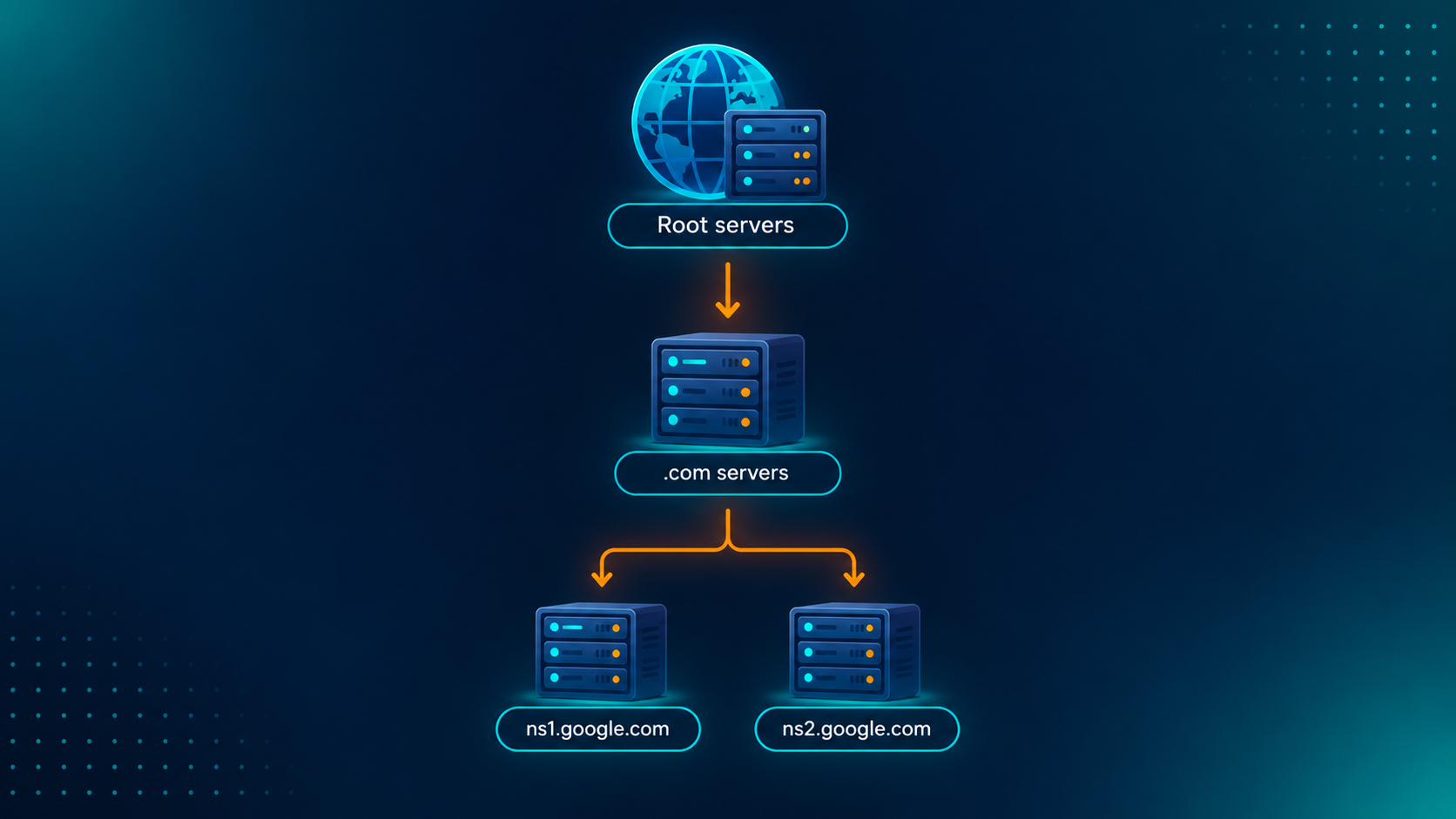
Root servers and .com servers are the first steps DNS takes to find a domain's name servers. I'll explain how that works in part 2.
A Record
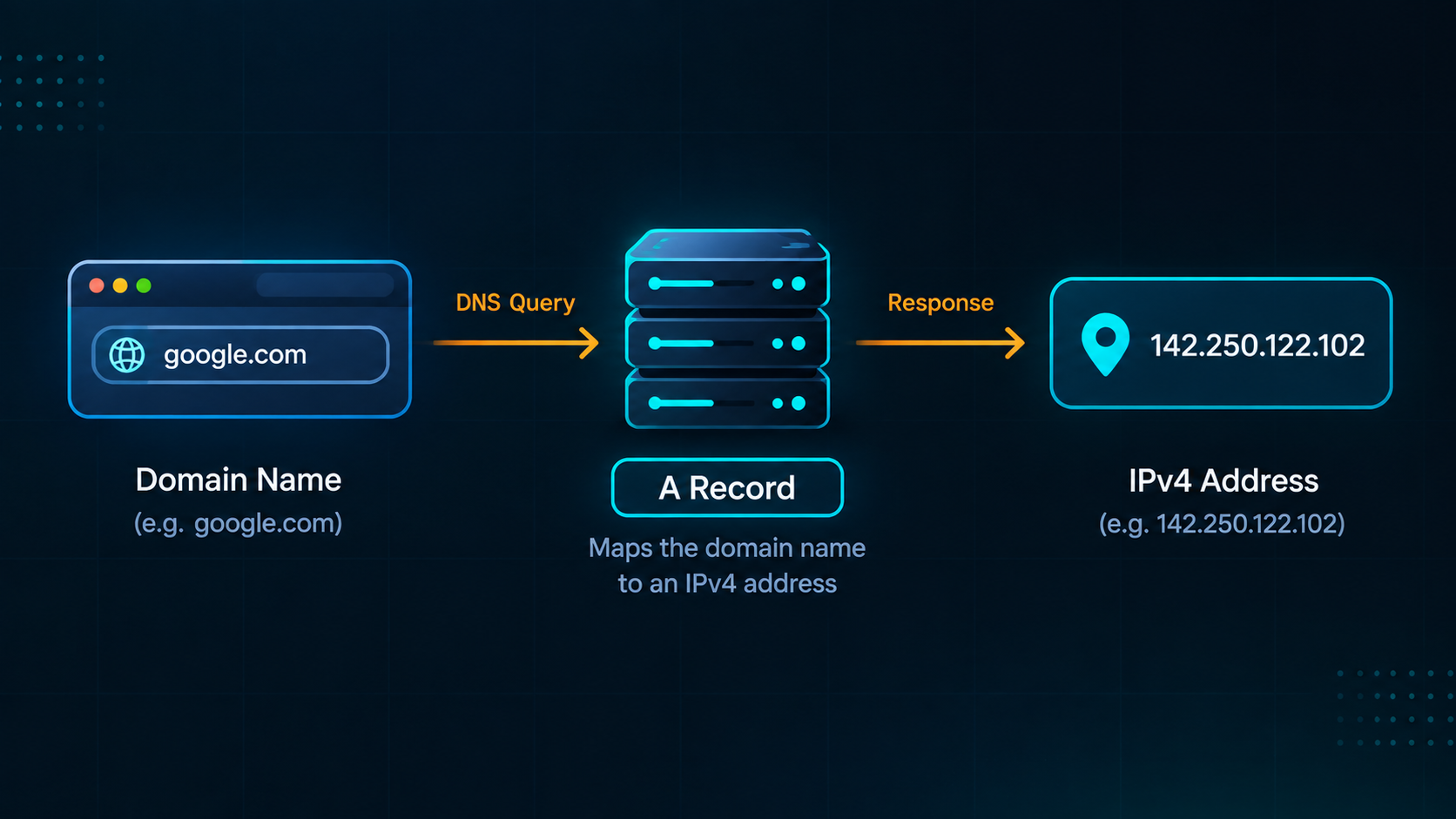
An A record solves the problem of connecting a domain name like google.com to an IPv4 address that computers use to communicate.
Real-life comparison: An A record is like a house address. You know the house by its name, but you need its address to find it.
Here is the real output I got by running nslookup -type=A google.com in my terminal:
google.com      142.250.122.102
google.com      142.250.122.101
google.com      142.250.122.138
google.com      142.250.122.100
google.com      142.250.122.139
google.com      142.250.122.113
Big sites like Google have many IPv4 addresses, so traffic can be shared across several servers.
AAAA Record
IPv4 addresses like 142.250.122.102 worked well for a long time, but there are only about 4 billion of them. With phones, laptops, smartwatches, and smart TVs all online, the world started running out.
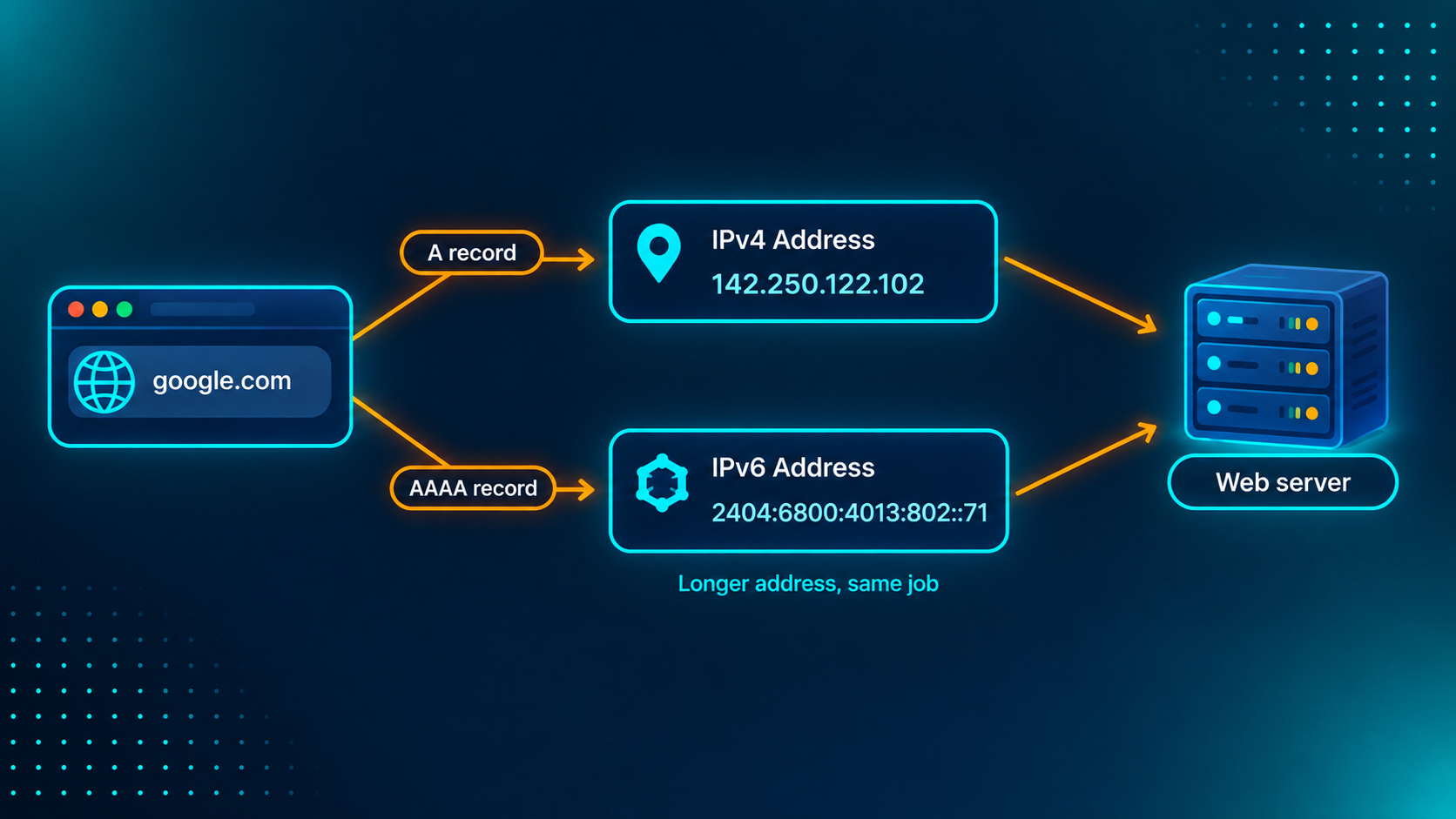
The fix is IPv6, a newer address format with a practically unlimited supply. An IPv6 address is much longer, something like 2404:6800:4013:802::71. The AAAA record (say "quad-A") does the same job as the A record, but for IPv6: it connects a domain name to an IPv6 address.
Real-life comparison: Think of a contact on your phone who now has two numbers, an old short one and a new longer one. It's the same person, and you can reach them on either. The A record is the old number, and the AAAA record is the new one.
Here is the real output I got by running nslookup -type=AAAA google.com in my terminal:
Name:    google.com
Addresses:  2404:6800:4013:802::71
          2404:6800:4013:802::8a
          2404:6800:4013:802::8b
          2404:6800:4013:802::65
Notice how much longer the address is compared to the IPv4 ones above. Most websites keep both an A and an AAAA record, so visitors on either type of network can reach them.
CNAME Record
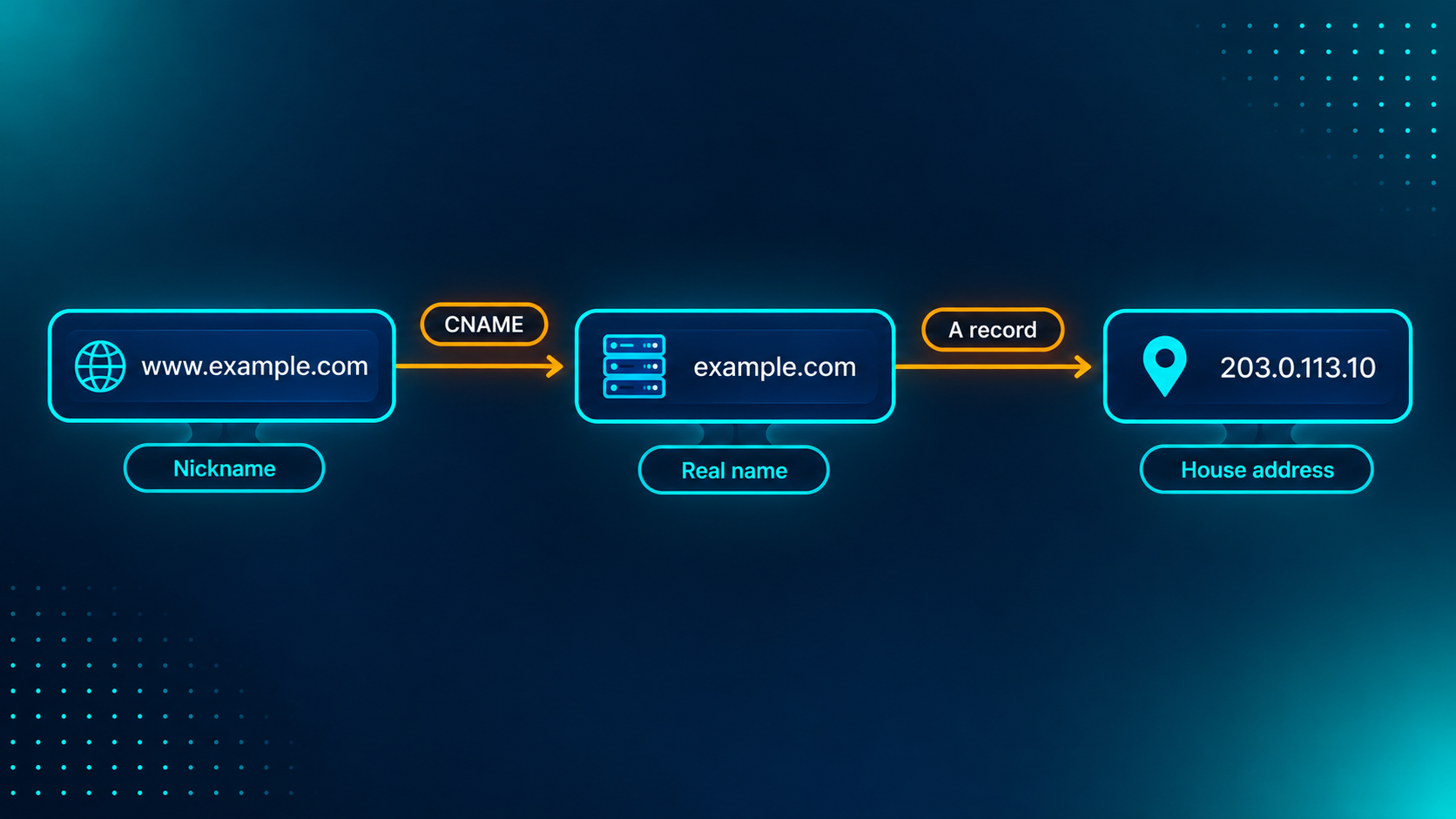
Sometimes you don't want to point a name at a number. You want to point it at another name. For example, www.example.com and example.com should open the same website. Instead of repeating the IP address in two places, a CNAME (Canonical Name) record says: "this name is just another name for that one."
Real-life comparison: Think of a nickname. Friends call someone "Bunty", but their real name is Rahul. If you ask for Bunty's number, you end up looking up Rahul's contact. A CNAME works the same way: it sends you to the real name, and the real name gives the answer.
Here is how a CNAME record looks (this is an example, not real output):
www.example.com. CNAME example.com.
This says: "www.example.com is another name for example.com. Wherever that goes, I go too."
Why use a name instead of an IP?
If your server's IP address changes, you update one A record, and every CNAME pointing to that name follows automatically. It's also how many services work. Platforms like Hashnode or GitHub Pages often give you a name to point your subdomain (like www) to, not a fixed IP.
A vs CNAME
| A Record | CNAME Record | |
|---|---|---|
| Points to | An IP address (a number) | Another domain name |
| Example | example.com → 203.0.113.10 |
www.example.com → example.com |
| Real-life | "Here's the house address" | "Same person, different nickname" |
Rule of thumb: if you have an IP address, use A. If you have a name, use CNAME.
One catch: a CNAME usually can't be used on the bare domain (example.com), only on names like www.
MX Record
Your website and your email are two separate things, and they often live on different servers. So when someone sends an email to hello@example.com, how does their email system know where to deliver it? That's what the MX (Mail Exchange) record is for. It tells the world which mail server receives email for your domain.
Real-life comparison: Think of an apartment building. Visitors use the main gate (the A record), but couriers and letters go straight to the mailroom. The MX record tells everyone where the mailroom is.
Here is the real output I got by running nslookup -type=MX google.com in my terminal:
google.com MX preference = 10, mail exchanger = smtp.google.com
This line has a priority number (10) and a mail server name (smtp.google.com). The lower number is tried first. Many domains list two or more mail servers with different numbers, so if the first one is down, email falls back to the next one. Google uses just one here, but it is a big setup behind that single name.
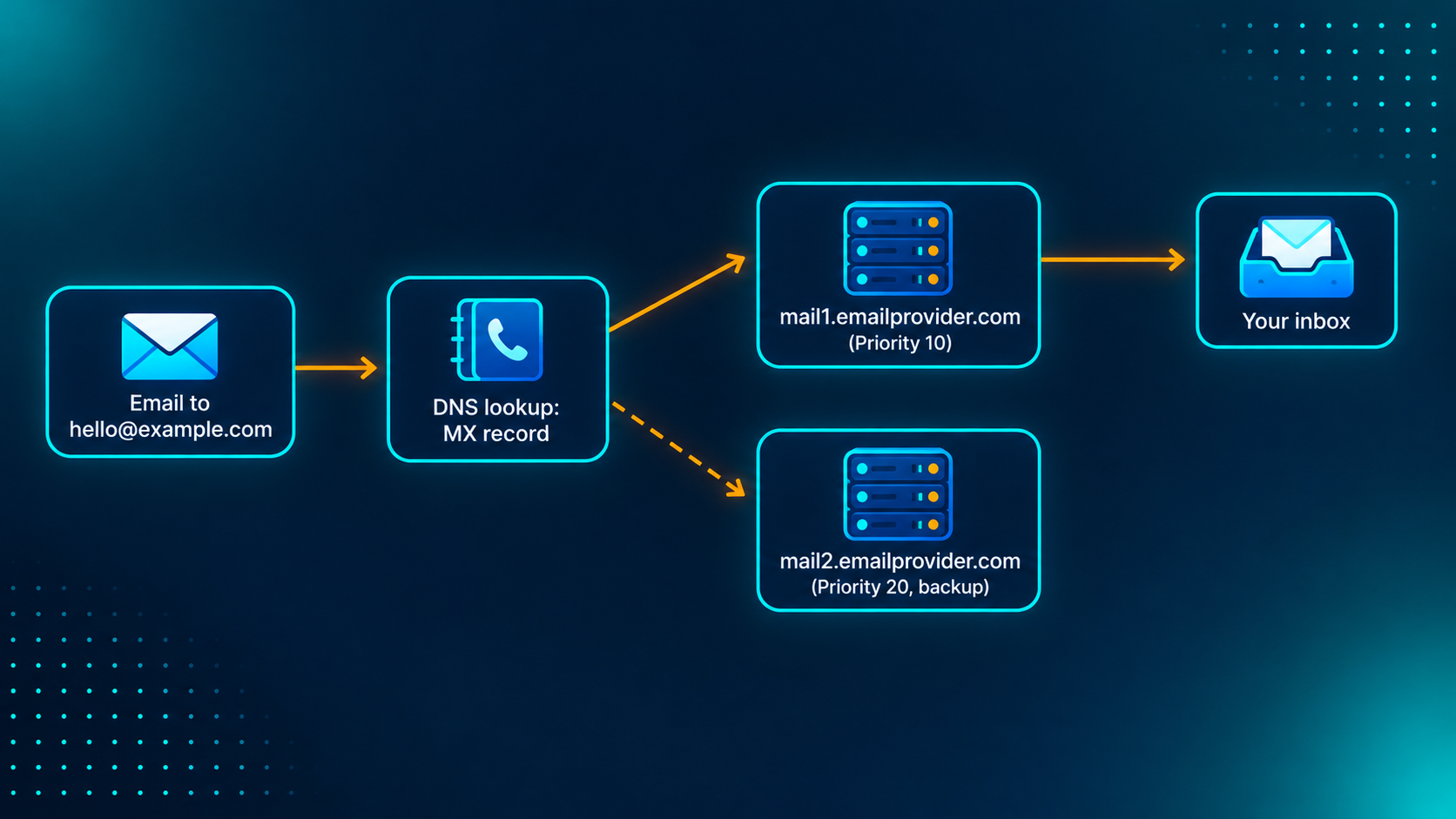
The diagram uses a typical setup with two mail servers. Google's real output above has one.
NS vs MX
At first, these two looked the same to me, because both are "server records". Here is how I separate them:
NS answers: "Who manages the DNS records for this domain?" It's the post office in charge of the area.
MX answers: "Where should this domain's email be delivered?" It's the mailroom for your letters.
NS tells you who to ask. MX is one of the answers they give.
TXT Record
The TXT (Text) record is a notes field. It doesn't send visitors or emails anywhere. It just says something about your domain, and other services read it. You'll mostly see it in two places:
Domain verification. Services like Google ask you to add a specific text value to prove you own the domain.
Email security. Records like SPF list which servers are allowed to send email on behalf of your domain, which helps stop people from faking emails from it.
Real-life comparison: Think of a notice on the gate of a housing society. It doesn't change where anyone goes, but it tells you something about the place. An SPF record is like a guest list at that gate: only the names on the list are allowed in.
Here is the real output I got by running nslookup -type=TXT google.com in my terminal. Google has 17 TXT records, so I'm showing just four:
google.com      text =

        "v=spf1 include:_spf.google.com ~all"
google.com      text =

        "google-site-verification=TV9-DBe4R80X4v0M4U_bd_J9cpOJM0nikft0jAgjmsQ"
google.com      text =

        "facebook-domain-verification=22rm551cu4k0ab0bxsw536tlds4h95"
google.com      text =

        "apple-domain-verification=30afIBcvSuDV2PLX"
The first line is an SPF record. It says only Google's own mail servers (_spf.google.com) are allowed to send email for google.com. The other three are verification records: Google, Facebook, and Apple each asked for a specific text value to confirm that this domain belongs to the same owner.
A domain can have many TXT records, because every service you connect adds its own note. That's why the full output looked so messy to me at first.
How all records work together
Remember the contact card from earlier? Here is the full card for a small website, example.com. Each row is one entry, and each entry answers one question.
| Type | Name | Value | What it does |
|---|---|---|---|
| NS | example.com |
ns1.mydnsprovider.com |
Says who manages this domain's DNS |
| A | example.com |
203.0.113.10 |
Sends visitors to the web server (IPv4) |
| AAAA | example.com |
2001:db8::10 |
Same, for IPv6 visitors |
| CNAME | www |
example.com |
Makes www work like the main site |
| MX | example.com |
10 mail1.emailprovider.com |
Delivers email to your mail provider |
| TXT | example.com |
v=spf1 include:_spf.emailprovider.com ~all |
Verifies the domain and protects email |
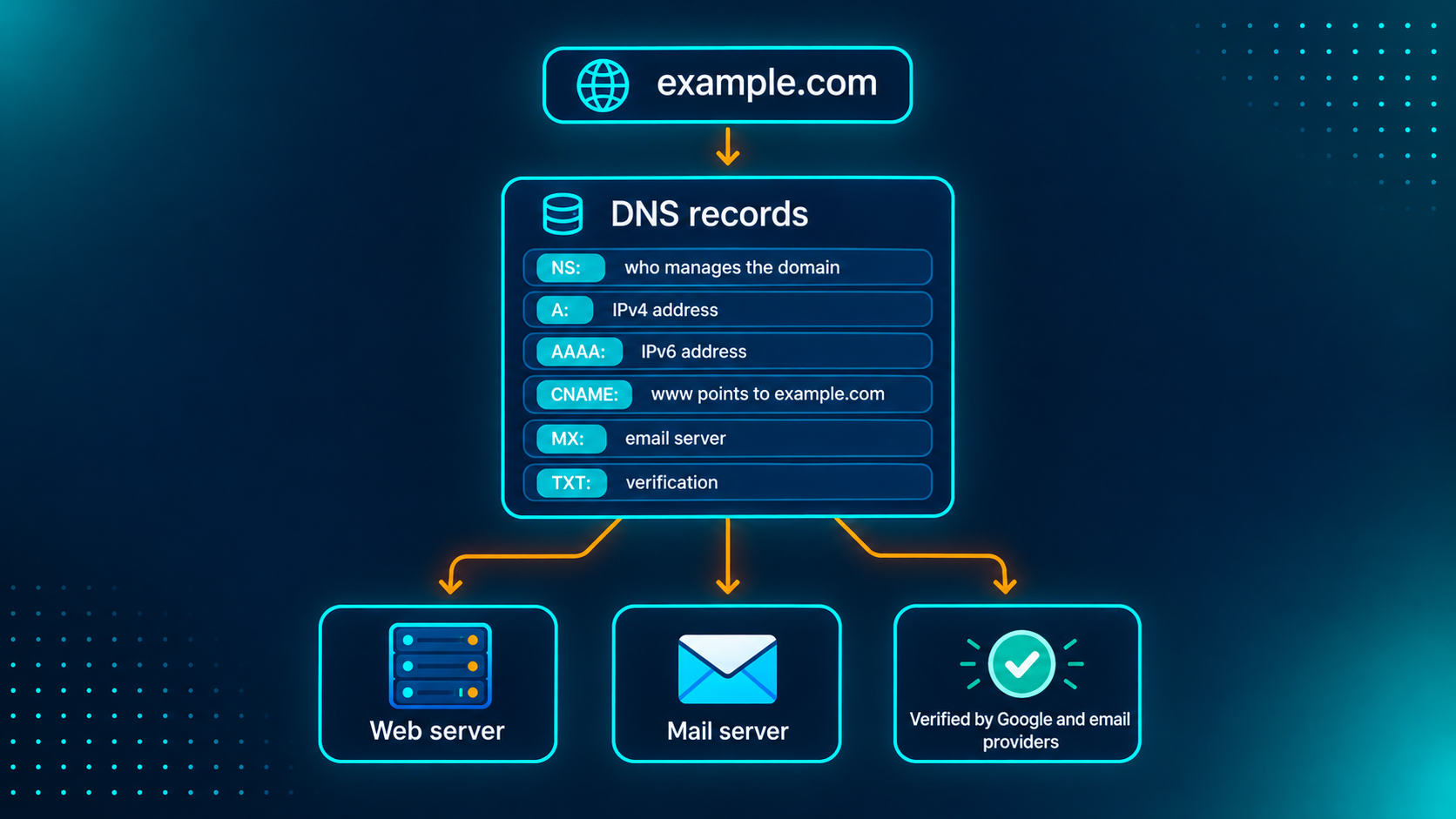
Here is what happens in real life, using the same records:
A visitor opens your site. The NS records tell DNS who to ask. The A or AAAA record gives the server's address. If the visitor typed
www.example.com, the CNAME sends the lookup to the main name first. Then the browser connects to the server and loads the page.Someone emails you. Their mail system looks up your MX record and delivers the message to your mail provider.
Gmail receives a message that claims to be from you. It checks your TXT record (SPF) to see if the sender is allowed.
Same domain, different questions, different records. Once I saw it this way, the DNS settings page stopped looking scary.
Try it yourself
You can look up all of these records yourself. Open your terminal and run:
nslookup -type=NS google.com
nslookup -type=A google.com
nslookup -type=AAAA google.com
nslookup -type=MX google.com
nslookup -type=TXT google.com
On Mac or Linux you can also use dig google.com MX. Try it on your own domain or a site you like.
Here is what I found for google.com:
| Record | What I got |
|---|---|
| NS | 4 name servers (ns1 to ns4.google.com) |
| A | 6 IPv4 addresses |
| AAAA | 4 IPv6 addresses |
| MX | 1 mail server, priority 10 (smtp.google.com) |
| TXT | 17 notes, mostly verification, plus 1 SPF |
You can spot each record by one keyword in the output:
| If you see this | It's this record |
|---|---|
nameserver = |
NS |
An address like 142.250.122.102 |
A (IPv4) |
| A long address with colons | AAAA (IPv6) |
mail exchanger = |
MX |
text = |
TXT |
Recap
| Record | One-line meaning | Real-life comparison |
|---|---|---|
| NS | Who is in charge of this domain | Local post office |
| A | Name → IPv4 address | House address |
| AAAA | Name → IPv6 address | Same contact, new longer number |
| CNAME | Name → another name | Nickname |
| MX | Where email is delivered | Apartment mailroom |
| TXT | Notes and verification | Notice on the society gate |
Final thoughts
So, how does a browser know where a website lives? It asks DNS. DNS finds the right name servers (NS), then reads the answer from the right record: A, AAAA or CNAME for the website, MX for email, and TXT for verification.
DNS looked scary to me at first, with all those acronyms. But each record is just one small answer to one small question. Once you know the question, the record makes sense.
I'm learning full-stack development, so my next post goes one level deeper: how DNS resolution works, from root servers to the final answer, using dig.
Which record confused you the most? Tell me in the comments, and I'll try to explain it better.